
If you have ever filled out a form online you have probably encountered a CAPTCHA. They come in many shapes and sizes. I am going to detail methods I’ve used to block bots from taking advantage of forms and their pros and cons. If you use a technique that’s not below just comment, the more options the better. Validating humanness should not be hard, why do some people make it that way?
 reCAPTCHA
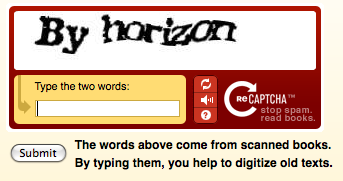
Solve a CAPTCHA and help digitize books. reCAPTCHA is the human extension of a project designed to digitize old textbooks. While scanning often there is words that the ORC scanner cannot recognize. These words are then pumped into a central repository where they are randomly displayed on screen for a human to decipher. Each reCAPTCHA has two words, one known and one unknown. If you get the known word right it is assumed you got the unknown word correct. If at least two people get the unknown word correct then it is marked as deciphered. Simple concept and for a great cause.
The biggest complaint about reCAPTCHA or CAPTCHA in general is the complexity of the images produced, sometimes almost unreadable by humans (especially if you have used ticketmaster.com). At least reCAPTCHA has the ability to refresh and grab a new pair of words or even read the words aloud. If you are forced to use a CAPTCHA, reCAPTCHA is your best option in my opinion
The biggest issue in my book with reCAPTCHA is Javascript is required to show the image. Although most bots don’t use Javascript neither do some legitimate users. Not only ones with disabilities but also ones on mobile devices.
Simple Questions
What is 3+2? If you can answer a simple math problem you must be human. This method relies more on someone comprehending a sentence and placing the right string in the form field. It can range from simple math to just repeating a word.
It’s great because the only programming needed is to validate a field is submitted with specific information. The down side is when someone cannot answer the question. Making questions too difficult or obscure can result in frustrated users.
 Hidden Field
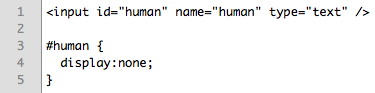
Bots rarely render their forms in a browser so hiding a field with CSS (or Javascript) allows you to determine if the form was submitted without being looked at. Only someone in a browser would not see a specific field, so if that field has content its likely filled in with a bot and you can ignore it.
Bots often fill fields with junk or things that look like text and try to match up the “name” attributes with almost valid data so “first_name” might result in an actual name. But they cannot resist a good type=”text” field since it allows them a great deal of space to inject HTML or BB code. Hidden text fields work great with they are type=”text”. Downside of this approach is someone viewing your page with CSS turned off might get confused to see a field with no label just sitting there.
Check Referrer
Did the form submission come from your site? If not do you care about its contents? After a form is submitted checking where it was submitted from is as easy as $_SERVER['HTTP_REFERER'] with PHP and Request.ServerVariables(“HTTP_REFERER”) with ASP (I think, I despise ASP).
Bots often will pull down your form and submit it remotely which creates a blank referrer. No referrer often means the form was not submitted through your site. The plus side of this method is the user does not have to do anything extra, the downside is you have to be careful when throwing away data, it might be legitament.
Confirmation Page
Is this information correct? A confirmation page is probably one of the best ways to supply a form to a user and verify if they are human while still making them feel comfortable with the information they submitted. Bots almost certainly don’t analyze the “Thank You” page so if your form goes to a confirm page where they have to click another button to confirm and submit their information it will more than likely not be compromised by a bot. The only down side to this method is the user has to click a Submit button then a Confirm button, there is a likelihood you loose someone in the middle.
 Just Deal With It
You could also do what most people do and just deal with it. Make sure your data has to go through an approval process before bring posted publicly or sent via email. This will ensure a human verifies the information on the form was submitted by a human. Too bad this is the most effective and time consuming option, there is no better way to spot a human than with a human (currently).
Some forms like login’s don’t interrupt your daily routine when captured by bots but a full inbox all the time can really get on your nerves. None of the methods above are foolproof so some spam may still get through but any one of the above is better than nothing. Don’t be left with an open form for bots to clog the internet, inbox and databases with.
Lets not forget about accessibility
While all these options are fine and dandy the first two require extra work on your users end. This throws the red flag to make sure they are accessible. Opting for an option that does not require any extra work on the users end is best but can lead to a higher spam rate. Weigh your options and determine which method is best for you, each form is unique and one solution cannot work for all situations.
Main image from XKCD.
Interesting and I totally agree.
I wrote about this a while back (last year) at https://www.draftmotif.org/2008/01/form-spam-prevention.html and you are right on the dot.
There is a choice but doesn’t it make more sense not to make the end-user do the extra work. After all your goal is to get them to do something, using the Captcha just makes a barrier to accomplishing that task (and lowers conversions).
A quick fix for the NON-CSS enabled browsers is to just label the field with something like “leave blank or skip”.
I’m glad to see that this option is becoming more widely known & yes the best solution is to just validate it with a human, however, we can at least limit some of that humans work load by coding it to be smart.
We are a CAPTCHA alternative company.
We would love the opportunity to get on your radar.
Please let me know if you would like a company briefing from our CEO.
thanks
aparna
I suppose the post above post is a good example of how having a captcha doesn’t stop spam
One thing to keep in mind is that many of these techniques only work on non-intelligent attacks. If your site becomes high profile enough these are easier to circumvent than something like reCAPTCHA.
This doesn’t apply to a lot of what we do in Higher Ed, of course, but it is nonetheless important to point out.
Hi Nick, thanks for a great article. I wanted to add one other option for blocking spam on Web forms, with Form Armor.
We’re a Web-based subscription service that stops spam and abuse on Web site forms completely behind-the-scenes, so there’s zero impact for accessibility or usability issues, or conversion rates. Form Armor stops bots and human-submitted spam, so you don’t have to choose between just dealing with it or creating extra work for your users. Just another alternative to consider.
Thanks again!
@Paul Nice article. Yes I forgot to put in a label, that would make it more usable.
@Jason Very true, high profile attacks change the whole dynamics of things. We had a case where someone programmed a “Send to Friend” function on a page that just blindly submitted and sent an email with the parameters. Once bots discovered it was sending out MASSIVE amounts of email.
@Larissa Thanks for mentioning third party options, universities with money who are looking for external services may be interested.
Well written article. I really enjoyed it. Keep up the good work.
I decided to create my blog and I will certainly introduce a program to verify are you human. This will be useful for me and thank because you mean to us.
To be honest, Nick. When comes into the CATPCHA matter, I preferred the simple math than type in the words into the column. CAPTCHA is a necessary device, especially for those website owners that want to prevent the spams that being generated by bots!
You are absolutely right Nick, the CAPTCHA can be avoided by applying some common sense and little bit of technical knowledge. Creating a confirmation page or providing one additional text box to fill the mathematical result are two great ways to validate the submitter as human.
As a user I like the CAPTCHA as it’s often real words and they are much easier to read than some others. The number of times I give up either ordering something or commenting on something because I’ve tried to input the code more than once!
I’ve never noticed the part about it being actual text from books, very interesting.
Thanks for the useful post.
As an end-user, I really find CAPTCHA irritating and hard to read sometimes. I’m usually happy with the simple math.
Regards
Hi Nick,
Thanks for such an informative post. I am suspicious about a human confirmation process that involves sending codes. Unfortunately, I have sent the code and now thinking if i’ve done the right thing. So stupid of me.
Can you please check this link and let me know of your expert opinion as to what kind of human confirmation thing is that:
https://eset.fwebpages.com/offline-update-pack/eset-nod32-offline-update-4365-20090825/
Please note that at the bottom of the page, initially one has to write in the shown words, the human confirmation method that is prevalent on the internet, but it is after doing that, the form asks quite a bit long code to copy and paste on to an empty field before clicking on the submit button to send the comments.
Have you seen any such thing? Is it legitimate? Does it look like suspicious?
Your reply will be greatly appreciated.
Bob
Hey! Just wanted to leave a comment. I truly enjoyed this article. Keep up the phenomonal effort.
The captcha technology is a backward development for deaf-blind people - do any of you have any resolution for deaf-blind computer users?
Google, Yahoo, Ebay, Linkedin, and many other websites have made their websites inaccessible for deaf-blind people
especially when they use the captcha technology. My friends who are deaf and blind are frustrated with this technology. Those who cannot see or hear characters displayed in the format of an image have to rely on sighted or hearing assistance in order to be able to enter the required information in given form fields.
The captcha technology is a backward development for deaf-blind people and we need to ensure no one is excluded from equal access to the web. There may be a software program that will translate captcha characters into text, but it is very time consuming and often there is a set time for these characters to remain valid. With the pssage of Senate #S3304, where do we stand in terms of possibly forming a group to focus on this issue and propose a regulatory procedure to require website hosts to implement the technology used?