
What is the difference between the following two pictures?


Well most likely you have to look really hard to tell a difference, if even then you can, and hopefully you can’t at all. Maybe when you brought up this page you noticed that the one on the left took a little longer to load? The picture from the left was taken directly from my digital camera and re-sized to fit on this page. (Unfortunately, I can’t claim that as my Christmas tree it belonged to my brother and his wife). The one of the right was optimized for the web for maximum clarity, but also to be web friendly. The first picture is 97KB and the one on the right is 22KB. The one on the left is over four times the file size! This is a small picture also, imagine if you have a much larger picture!
Optimizing graphics for the web is something that is very important and although many people know that it’s good to do, I think without a full understanding of why most people simply don’t spend the extra time on this.
Optimized web graphics provides multiple benefits including:
- Less storage space on the server
- Less bandwidth is needed to process the file
- Less storage and bandwidth needs mean that hosting cost are decreased
- Faster file and page loads correlate to a positive visitor experience which can lead to more visits
Also optimizing web graphics is environmentally friendly! By reducing the load you’re requiring of web servers you could extend the life of the machines resulting in less computer waste. Using less storage space and bandwidth also results in a decrease in electricity consumption. The use of dial-up connections continues to decrease those users will definitely commend you for making their browsing experience more enjoyable. On a high speed connect the difference between a two seconds load and three is minimal this could add many seconds or even minutes to page loads for dial-up users.
So let’s recap: Optimizing web graphics are good for web servers, good for Internet bandwidth, good on our wallet, good for our clients, and even good for the environment!
What do I need to know to Optimize Web Graphics?
 Although the .png format continues to break into the market I’d still try to stay away from using it. The two main file types for web images are .jpg and .gif. For a basic rule of thumb .jpg are for pictures and .gif are for graphics. This rule stays true for 95% of pictures, but there are times when you can cut off a few extra kilobytes with graphics using .jpg.
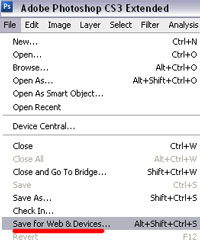
So let’s look at how we optimize using Adobe Photoshop CS3. After editing your image you would then go to File -> Save for Web & Devices… In earlier versions of Photoshop I believe it simply says Save for Web.
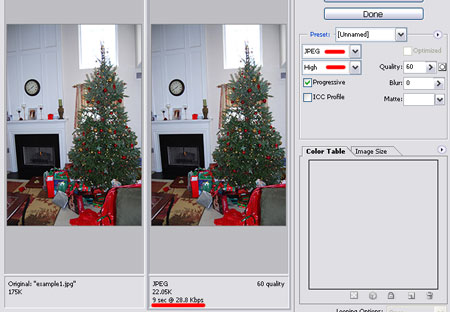
This would then bring up a screen where you can save the file for different formats and at different settings. In his picture we have the original and the optimized one where we can see what the size is and look to make sure that we aren’t losing any quality. For JPEG’s the settings Low, Medium, High, Very High, and Maximum are probably all that you will ever need. For a GIF the Colors settings are the quickest and easiest thing to change. Depending on how many colors are in the graphic and any gradient designs you maybe be able to down as far as 16 colors. For most graphics you can get away with 32 or 64.
Final Notes
Don’t be afraid to tinker around with any of the setting in the saving for web window. Keep in mind that it is possible to over optimize. You want to get the file size as small as possible without losing any of the visual quality so it’s critical to find a balance and every image is different. If you optimize a JPEG to much it will look blurry and a GIF tends to look pixelated. Quality graphics and pictures are very important to your site so use your best judgment to optimize but don’t compromise site quality to save a few KB of download. Personally, I am always willing for my files to be a little large and look slightly better.
 If you don’t have have Photoshop or the change to throw on on a copy, then Picnik is a wonderful editing tool that is completely web based and free for basic use. Even if you do have Photoshop it’s probably worth checking out.
So make sure that you do your part to keep the web a faster and bandwidth friendly place. Imagine the environmental effects and savings that could be created if everyone would do their part? So please forward this to any and all your users to inform them of the importance of following these standards.
For more information about Web Graphic Optimization you can visit these resources:
- GraphicsOptimization.com
- webreference.com - Optimizing Web Graphics
- Everyone’s Guide to Optimizing Graphics
Useful tips, for total newbies anyway.
I noticed you mentioned the site Graphics Optimization I saw Derek present and he has a wealth of knowledge on this subject. I wish I had the slides from his presentation.
You can get better results by quantizing your image (or otherwise hand-reducing your colormap) and saving it as an indexed png.
If you already have a 256 color image, saving it as png and using pngrecolor could save you even more.
@Andrew - I really wrote this out because it seems like I have to tell someone this a few times a month, now I can simply refer them to this. We literally have a hundred website editors who all are newbies so now that I’ve actually written out the reasoning I don’t have to explain it ever again. Save it and I’ll bet you will get a time when you are glad that you did to simple send someone a link and not have to explain something for the 10th time.
@Matt - I read something Derek put together a month or so ago and it reiterated that I needed to finally sit down and spend the time to write this (see above)
@Director of Web Marketing- I think what you are talking about goes a little into the over optimizing that I talked about in the final notes. You are absolutely correct, but there gets a point where diminishing returns start to add up and the time it takes to save those last few KB’s just aren’t worth the time. Also it’s still probably a year away from me feeling comfortable using .png on the web. I know all new web browsers handle them fine, but there is still some older browsers that don’t. Maybe it’s just me being a little old school also.
Thanks for the comments guys!
My ears were burning today (thanks to Google Alerts finding this posting), so I thought I would respond to Matt’s comment about that HighEdWeb session I gave in Rochester by saying that a .pdf copy of those slides are available at:
Pretty good article here related to exposing folks to why optimization is important…although the part about “avoiding .png” is not good advice IMHO, specifically related to 8-bit .png…it’s 24-bit .png that still has some issues (either that, or MAJOR players such as Google, Microsoft, Yahoo, etc. are in a hornet’s nest of trouble with several of their major online services and don’t even realize it yet - wink). That, and Photoshop (any Adobe product that I have seen) comes up substantially short when it comes to what is truly possible related to maximum file size reduction (I wouldn’t recommend either program’s features as ideal “optimization” solutions unless you’re just trying to hit the ‘Save/Export for Web’ crowd who doesn’t want to be bothered with ANY extra time while attempting to achieve better results).
For example, I ran the “optimized” image above (example2.jpg) through xat.com Image Optimizer, removed extra colors, then applied a bit of custom zonal compression to different regions of that photo, and took 22,474 bytes down to 18,997 bytes (a further 15.5% reduction) without any noticeable image degradation. I can email that new .jpg file to Founderif I can get an email address.
Not the fault of Photoshop, per se! There’s just lots of better tools out there for this highly-specific task. Photoshop is a phenomenal program…but it cannot be expected to be the BEST at everything!
Anyone who feels passionate about this issue though gets lots of positive karma in my book! We need more people out there “preaching” on this particular topic, ESPECIALLY as the mobile web becomes more and more prevalent in our daily lives.
I think the greatest image degradation can occur while resizing a large image down to a web-friendly size. If you go from original to final size in one step, even Photoshop interpolation will miss some opportunities.
My practice is to reduce the image 50% until I define a final pixel size, applying sharpening as needed after each step. Are there better ways to accomplish this?
Optimizing your images will make your website run faster… youll save space and overall save money on bandwidth great post!
I have tried your strategies on a animated gif text with no background. when I scale down to 16 it gets extremely blurry, the greatest clarity I get is at 256. I am having a big problem as the glitter animation is fallin outside the edge of the pic when you post it on a persons social networking profile.How do I get clarity and keep the glitter within the boundaries of the stroke?
have a look at the sample i have been testing
https://www.hypecomments.com/graphics/show/id/1004/category_id/0
Very interesting tutorial. but limited to CS3. I am using CS2. Know i have to buy CS3 for more modren techniques. I have visited” Everyone’s Guide to Optimizing Graphics” and it is very informative for optimization of graphics.
Good.. I really appreciate.
ITS SUPERB..
those are awsome, thanks for sahring!
very great post! interesting conversation….
hi, I totally agree with you that image optimization is very important. I am new at this, I have been working on optimizing phhotographs for the web and for this I downloaded contenta converter trial version from the net. That also seem to be user friendly for a person like me who has no knowledge of Adobe . Your post is good, you have explained the process very well, not many people give explain in depth.
This is a good tutorial for new graphic artists - less bandwidth - less storage needed.
Hi - liked your article - I wrote something similar for users of our learning platform. One thing we use a lot is the free Microsoft Image Resizer Powertoy (for Windows XP) and the Image Resizer Clone tool for Vista (open source).
With one of these installed simply right-click on an image in Windows and re-size it, then upload the resized image.
Whats great about these is users don’t have to learn to use a graphics editor to resize their images.
Their climber was so skilled it made taking down the diseased tree look easy. We have had some real winners?!?!?
it’s a really fundamental thing to understand when displaying images on the web, there’s lots of ways to do it but if it looks good and is a reasonable file size, job done i say!