
I promised a followup to the mobile site roundup, and by jimminy I deliver. If you follow me on Twitter, you’ve probably caught wind of the release of Pittsburg State University’s new mobile web site. This has been a big step for us for a number of reasons. Our deployment isn’t perfect, we aren’t as feature rich as some, but what we have done is create a great foundation to move forward on. Here’s how we did it.
First, a couple thoughts. If you are waiting to work on the mobile web, you’re already behind. You should be planning now, at the very least. Higher education is notorious for playing catch up on technology issues, don’t let that happen here. Don’t make excuses. The mobile web is not going away. It’s not a fad. It’s not something that you want to sit and wait to “see what happens.” In the brief history of the web, we’ve seen only a couple major paradigm shifts in the Internet. The first was the shift from a small, infantile web where a few companies had staked territory, to one where anyone and everyone could have a site. Suddenly the web flattened out. The second shift was to the read-write web, a place where not only can you have your site, but you can contribute to others. The web socialized, it began to get a personality, and it was your personality. Now, we are moving to mobile devices - the next shift. I don’t look at this as a technological shift (by itself) because the change occurring isn’t just about the hardware, it’s about how we design, architect, and consume information. The ubiquity of mobile devices and the rapidity with which they are penetrating society is something entirely different from what we’ve dealt with before.
So, the good stuff. First off, let me be clear. I’m a one man army, like many of you. This project wasn’t the result of the effort of a team of a dozen people over 6 months. It was me, a couple weeks, and a lot of lost sleep. To do this, I committed to the idea that it would be a pet project. I went home, and lived mobile data and code until 1:00 or 2:00AM every morning (as my wife would probably angrily attest to). I did this because I understood that in terms of priorities, it just didn’t really fit in the 9 to 5 for me right now, but it was also something that I believed couldn’t sit around and wait for my normal project schedule to lighten up. Maybe you’re luckier. If you’re not, do what you have to do. But like I said, don’t make excuses, don’t tell me that you don’t have enough resources to get this done, because you do (you just might need to keep a little extra coffee on hand). Besides, it’ll make you look great to your boss, assuming your boss doesn’t mind you going off all maverick and coming back with cool new tools. And I won’t lie to you, you might have to take a chance on this that people will see it and be on board with launching it, especially if you’re doing it like I did as a side project. Part of me feels that you have to be willing to take those risks though when you’re in web development. Playing it safe means you’ll only ever be average.
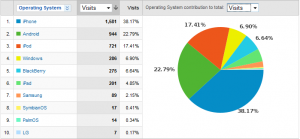
Mobile Analytics Stats
I started with analytics, because strategy starts with informed planning. For a while now, Google Analytics has had built in visitor segmenting by mobile devices or carrier. Mobile web is still very much in a maturing phase, and one of the big questions you should consider is how to target users needs. Now, here’s quotable quote #1: Yesa well coded, properly built site should be able to be used on any device. That is the ideal, and it is not unreasonable to say “this is what I want to strive for.” But, this project isn’t about converting your normal site into a mobile friendly template so it works everywhere. In my case, I saw that over 83% of my users were on devices with WebKit based browsers. Based on that fact, I decided to take a slightly different route, and I’ll explain why as we go on. I started with the idea that users coming to our site were coming for specific tasks, and I was able to back that up with analytics (logins and email the big two). Now I had a starting place to build around, knowing that I had certain things to cover that mobile users were definitely doing. . That’s not to say it’s okay to ignore that other 17%. What I’m doing is trying to provide a killer experience to the biggest audience I can, with the goal to roll the rest in as best we can over time. Rather than taking a long time to get everyone, I’ll take a little time to get most people, and deal with the long tail.
jQTouch Website
jQTouch is a jQuery plugin for websites that allows you to rapidly deploy mobile sites that are feature and function rich. The catch is that it really only works in WebKit browsers. So, question number one you need to answer is if the feature tradeoff is worth it. In my case, I said yes. I was willing to sacrifice the 17%, not just because of the features, but because jQTouch gives you the added bonus of allowing you to build and deploy a site relatively rapidly. But, there are also other platforms, such as the MIT Mobile Web framework that would similarly enable you with somewhat better compatibility, albeit lest whizbang factor out of the box (plus we aren’t a PHP shop).
Another benefit of jQTouch is that it can effectively allow you to build an entire site in one HTML file (obviously including CSS and JS includes, which add a not insignificant amount of overhead, I recommend compressing them all). Once the page has loaded, it can give you access to a large amount of information very quickly, without page load delays in between. I use this for most of the core navigation and pages, then use the built in AJAX detection to handle things like the news feeds and events which change frequently. I should note that our content management system, dotCMS, allows me to be extremely flexible with dynamic content reuse on our site. Doing custom things with content used elsewhere on the website is an extremely painless process for us. I hope you are just as lucky in that case, because it will dramatically improve your development process. If not, RSS feeds can be your friend.
What it amounts to is jQTouch lets you design a mobile site that can behave very much like an iPhone application. Why would you want that? Because it’s not about pages anymore. Mobile usability is a completely different realm from our normal websites, so it’s not good enough to just do a mobile compatible layout (this goes back to the earlier point). It’s the information that is important. You have to take into account how people are using your site from a mobile device, because their activities will be substantially more action and goal driven than they would be sitting behind a PC. We are stewards of information, and webpages are the vessel. But the terrain is changing, and that means we need a new vessel for our information. It’s about the content, the context, and the motives
Now, quotable quote #2: Never stop improving! Ever. Our initial feature set was based on two things: what our analytics told me about where on the site people were going while using mobile devices, and what I could easily integrate without polluting the interface (news and calendar). From within the mobile site and from the site’s PC based about page, there are links to recommend features or report bugs. Believe it or not, the people using your site will tell you what does and doesn’t work for them. You just have to be listening. And once in a while you might have to get out and ask. My point is, don’t make guesses about what your users need, let them inform you. Over time, you might discover certain features go stale as user tastes, trends, and expectations change. Be prepared to cut away things that didn’t work or don’t work anymore to make room for better tools. User needs will change. But you have to be paying attention in order to address it.
Along with that, you need to set some kind of goals, so that you know what to strive towards. But be realistic. Don’t come out saying you want to do something that would completely require a change in the fundamental way someone expects to use the site: for instance, getting 10% of admission applications from mobile devices isn’t exactly realistic, because that’s not an activity you would expect people to be doing from a mobile device anyway (or maybe they are, if that’s what your analytics tells you, in which case that’s pretty awesome on its own). Start with reinforcing anticipated behavior and building expected behavior.
So, to recap:
- Start checking your analytics, get out and ask people, find out what mobile users are doing on your site now.
- Figure out what you can easily, and rapidly get out to those users from that list, plus anything else that could be valuable.
- Pick some kind of framework or model to base your site on. Don’t reinvent the wheel. Don’t run before you can walk.
- Change how you think about “web content.” Consider how and where it is to be used.
- Set up a couple goals, something simple, something realistic.
- Build it. Include analytics in it.
- Watch. Listen. Measure.
- Improve it. Make new goals.
- Repeat steps 7 and 8 until you die.
Once your site is out in the world, you can start to really refine the experience. If you have the developer backing, you can even easily turn that site into an actual mobile app using tools like PhoneGap, letting you kill two birds with one stone. Suddenly, not only are you maintaining a mobile site, but you’re covering five different mobile app markets, with barely more overhead than the initial site.
I will be presenting on mobile web strategy with HigherEdHero.com July 29th at 12:00PM CDT, so mark your calendars if you want to get more information on this topic.
Bravo on the new site! It’s a great addition to Pitt State. I just have a few comments and questions. I’m working on a mobile site and getting my feet wet with this and it’s frustrating! It’s like learning HTML email all over again.
Don’t make excuses:
“… don’t tell me that you don’t have enough resources to get this done, because you do (you just might need to keep a little extra coffee on hand).”
I’m glad you had the gumption to go and achieve something great on your own time, but this type of attitude bothers me. As a higher ed Web developer, salaries aren’t exactly competitive with the rest of the market and overtime (with budget problems) isn’t an option. Sure, you might look great to your boss, but you also might set a bad precedent and people might expect you to work extra on other projects that you don’t like as much.
Don’t get me wrong, I love my job and I strive to do the best I can, but my time is my time and I don’t work for free. My family is way more important. If mobile Web is so important, your boss needs to make it a priority and give you the time and resources to get it done. Otherwise, it’s not a priority and you shouldn’t feel like you have to use your time on it.
It’s sad, but I’ve had the experience of being burned for doing too good a job. It’s not making excuses, it’s knowing your boundaries.
Analytics:
With Google analytics, are you only getting devices that support javascript? What about other mobile devices? How do you track them? How do you know they aren’t a large part of your audience? Maybe that 17% is a lot higher than you think. 20-25% isn’t something to ignore.
jQtouch:
It really only adds fancy transitions and some AJAX. It’s nice to throw it up, change some colors and have a functioning site, but I don’t think those bells and whistles are worth cutting out 17+% of your users. jQTouch not working at all with Blackberry devices is a big issue on our campus.
I did some experimenting and you can easily make mobile designs function with more devices by not using jQtouch at all and just build regular Web pages. This not only makes things easier to develop, but you can also sprinkle in some iPhone meta tags and Webkit-specific CSS (like drop shadows and rounded corners) to make it pop on an iPhone or Android phone. This helped me out a lot: https://developer.apple.com/safari/library/codinghowtos/Mobile/UserExperience/index.html
Some other things to worry about with Blackberry:
* Anchor links that make the page transitions work do not function. You might still be able to use other parts of jQtouch if you just remove that part and break up content into separate pages.
* Absolute positioning is ignored.
* It fails to recognize styles on elements that have multiple classes.
Anyway, not trying to poo poo on your work. I think you did a great job! It’s good that you thought about the content and made educated decisions about what devices you were going to support. Even if you use an iPhone framework, it’s better than no site at all. Besides, most new mobile devices are going to have Webkit and the lifespan of a cell phone is so short the ones that don’t work will go away soon enough.
RIM’s Blackberry browser won’t be a issue soon as they are moving to Webkit in the coming months. Bravo to Director of Web Marketingon this.
You are absolutely spot on across the board, and I’m with you every step.
On extra work: I think it’s important to make clear when a case is special. If folks start saying “Well, you did X in your spare time, why can’t you do Y?”, that’s when you need to be clear that your time outside work is yours to do with as you please, and once in a while if you choose to use that to do a cool project for a school, that’s your prerogative. Most rational people will get that. If they don’t, your problem is much bigger. If that sets a “bad precedent,” as you put it, then it sounds like there needs to be some other issues addressed. My emphasis here is that this is an area important enough that you need to find the time, not that you should find the time all the time for every little thing.
On analytics: Yes, for Google Analytics to track them, they need basic javascript execution abilities, which most all major smartphones do. There are analytics systems that claim to get around that, but they are pretty much all paid services. That means the best you can hope for otherwise is to sample people manually with surveys. What I will tell you is this: mobile device usage that doesn’t support that basic level of code execution is going to drop off RAPIDLY over the next year. Yes, it’s possible there are a lot of people using old Motorola Razrs to access our site, but you have to draw the line. At one point, I said I wouldn’t support IE6. That’s a move you have to make. The nice thing is the boom in mobile device usage is also coinciding nicely with product evolution. The thing is, at this point the best I could do is guess at what number of people might be using non-JS friendly devices. I’m not going to make decisions on those guesses. Let me hit the top 83% fast, and then roll in the rest from there.
On jQTouch: If you have a large Blackberry population, you obviously have to take that into account. I’m not saying jQTouch is right for everyone, you have to take your community into consideration.
On Blackberry: My hope is that Blackberry issues will become a moot point soon, as it sounds like the WebKit based browser they acquired from Torch Mobile will be coming in the next update. I can afford to wait and see on that right now. That won’t just level the playing field, it’ll pretty much flatten it.
Great post. I especially like the very strategic method that you went about doing this. The strategy helped keep cost down and you knew exactly what you wanted to achieve. And the list of the recap is very useful. I like 7 and 8. Just because the site is up, doesn’t mean it is the project is ever completely done - it is an ongoing site that has to be maintained and changed to fit the needs of it users just like any other site.
Many people just end up throwing a new site or a new feature up because it is cool, without a lot of thought behind the strategy. Congrats on a great site!
Great post indeed. “Watch, Listen, Measure, Improve.”
Too often the mantra instead is “Listen, React, Leave Behind, Fail”